A Trustworthy PCB and Electronic Manufacturing Enterprise! Contact Us


In electronic product design, connectors may be small, but they directly affect reliability, stability, and the overall user experience. Among them, the 2 Pin Connector PCB (two-pin PCB connector) is one of the most basic and widely used interface types. It is extensively applied in LED lighting, power modules, home appliances, and industrial control equipment.
In real-world projects, many issues—such as heating, poor contact, loosening, or even burning—are often caused by improper connector selection or PCB design. Therefore, understanding the design logic of 2-pin connectors is essential for both engineers and procurement professionals.
This article provides a comprehensive overview from definition, types, selection criteria, application scenarios, to PCB design optimization.
1. What is a 2 Pin Connector PCB?
A 2 Pin Connector PCB refers to a PCB design that includes a two-pin connector interface used for power or simple signal transmission.
Its core functions include:
Providing stable and reliable electrical connection
Enabling quick plug-in or wiring operations
Improving assembly efficiency and maintenance convenience
In practical applications, this interface is mainly used for:
Power input (V+ / GND)
Simple switching or control signals
Basic inter-module connections
Due to its simple structure, low cost, and high adaptability, the 2-pin connector is a standard configuration in low-to-medium complexity electronic products.
2. Common Types of 2 Pin Connectors
Depending on structure and application requirements, 2-pin connectors on PCBs are mainly categorized as follows:
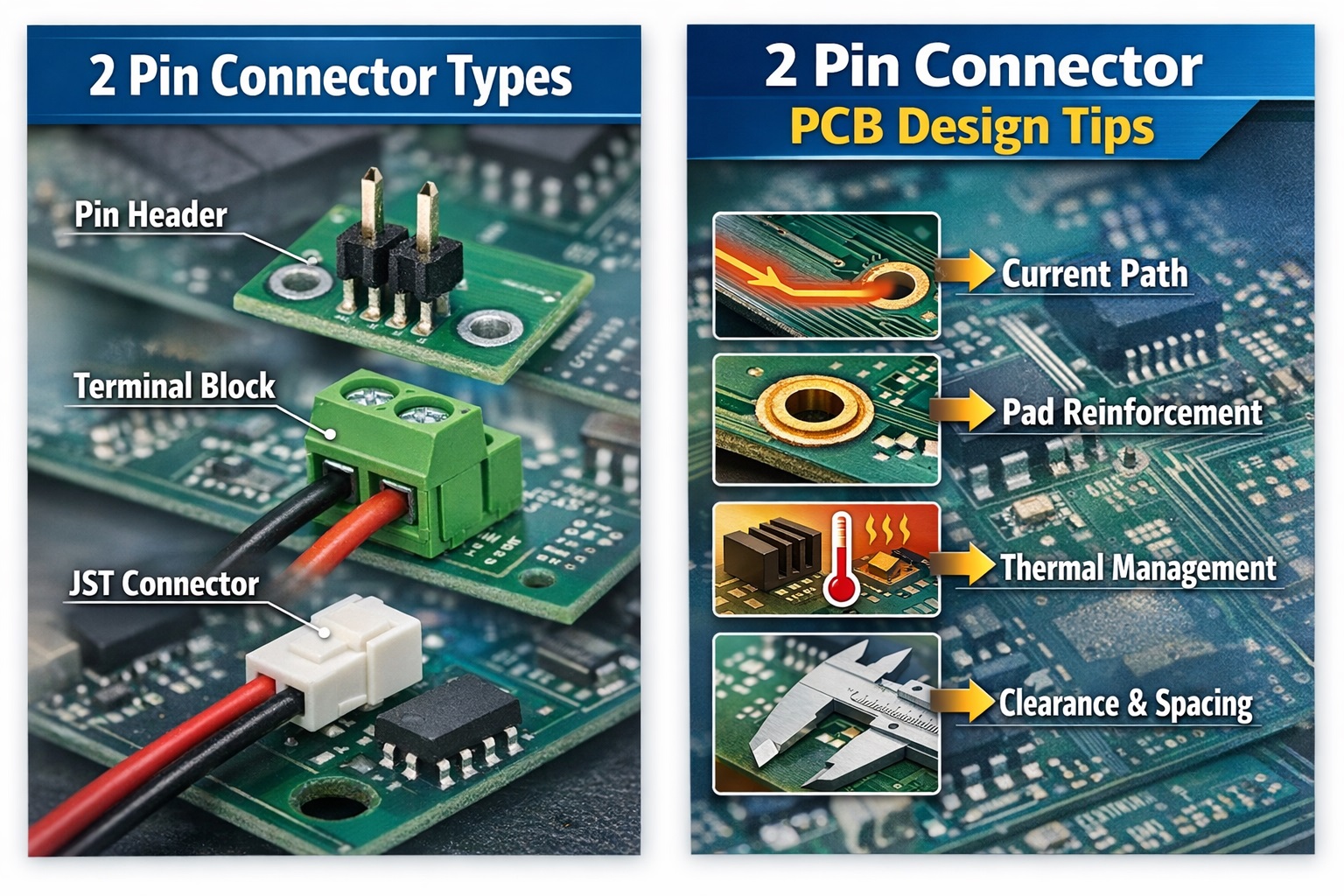
1. Pin Header
Pin headers are the most basic and commonly used connection type, with typical pitch of 2.54mm and also finer versions like 1.27mm.
Features:
Low cost and easy sourcing
Highly standardized
Flexible pairing with female headers or wire harnesses
Limitations:
No locking structure
Lower vibration resistance
Contact reliability depends on mating quality
Applications:
Development boards and modules
Test fixtures
Low-cost consumer electronics
2. Terminal Block
Terminal blocks are one of the most common solutions in power-related products.
Features:
Allows direct wire locking
High current carrying capability
Strong vibration resistance
Applications:
LED driver power supplies
Industrial control systems
Power input/output modules
In LED and industrial applications, terminal blocks are often the preferred high-reliability solution.
3. JST Connector
JST connectors are widely used in consumer electronics and compact devices.
Features:
Compact size
Latching design prevents loosening
Easy plug-and-play operation
Applications:
LED strips
Battery connections
Small electronic devices
3. Key Selection Parameters for 2 Pin Connectors
Connector selection must consider not only appearance but also electrical, mechanical, and environmental performance.
1. Pitch
Common pitch options include:
2.54mm: standard general-purpose use
3.96mm: medium current applications
≥5.08mm: high-power applications
General rule: Larger pitch usually supports higher current but occupies more PCB space.
2. Current Rating
Typical current capabilities:
Low current (<2A): pin headers / small JST
Medium current (2A–10A): terminal blocks
High current: custom or reinforced connectors
Engineering recommendation: Always design with at least 1.5× current safety margin.
3. Contact Resistance
Contact resistance is a key factor affecting heating.
Poor contact can lead to:
Local overheating
Increased power loss
Reduced long-term reliability
For high-reliability designs, tin-plated or gold-plated contacts are recommended.
4. Typical Applications of 2 Pin Connectors
1. LED Lighting Industry
2-pin connectors are commonly used for power input or daisy-chain connections in LED systems.
Applications include:
LED panel light power input
LED strip power connection
Multi-module LED board linking
Characteristics:
Long continuous operation
High requirement for contact stability
Focus on heat control and long-term reliability
Terminal blocks or locked JST connectors are commonly used.
2. Power Modules
In AC-DC or DC-DC modules, 2-pin interfaces serve as key input/output points.
Examples:
AC input (L / N or DC+ / DC-)
DC output terminals
Key concerns:
Inrush current
Thermal rise under full load
Insulation and creepage distance
Industrial-grade screw terminal blocks are often preferred.
3. Small Appliances & Consumer Electronics
Used in devices such as treadmills, fans, air purifiers, and humidifiers.
Characteristics:
Cost-sensitive
Compact design
Possible maintenance or replacement needs
Common solutions:
JST connectors for compact designs
Simplified terminal blocks for medium power devices
Anti-mismatch (keying) structures to prevent incorrect insertion
4. Industrial Control Equipment
Used in automation systems for:
Sensor power supply
Digital signal input
Simple control circuits
Requirements:
High reliability (5–10 years operation)
Harsh environments (vibration, temperature, humidity)
Design considerations:
Screw-lock or industrial-grade connectors
Anti-loosening structures
Anti-corrosion plating (tin/gold)
Strict electrical clearance standards
5. Key PCB Design Optimization Points
1. Current Path Design
Poor current path design may cause:
High current density
Copper overheating
Reduced reliability
Optimization methods:
Keep current paths short, wide, and direct
Use large copper pours for high-current areas
Avoid narrow trace bottlenecks
Use multi-layer parallel routing if needed
2. Pad and Hole Design
Connector areas are high mechanical stress zones.
Key considerations:
Follow datasheet-recommended pad sizes
Consider assembly tolerances
Increase annular ring for strength
Use teardrop pads for high-current areas
Poor pad design is a common cause of pad lifting in mass production.
3. Mechanical Reinforcement
For vibration or frequent plug-in/out environments:
Add PCB mounting holes
Use multi-point soldering
Apply epoxy reinforcement
Use connectors with locating posts
4. Thermal Management
Connector regions often accumulate heat due to current + contact resistance.
Risks include:
Connector overheating
Plastic deformation
Accelerated oxidation
Optimization:
Increase copper area around connectors
Optimize current distribution
Avoid clustering high-power components
Perform thermal simulation if necessary
5. Layout and Assembly Space
Important considerations:
Ensure sufficient plug/unplug clearance
Avoid mechanical interference
Align connector direction with assembly flow
Ensure compatibility with manual and automated assembly
6. Conclusion
Although the 2 Pin Connector PCB structure is simple, it plays a critical role in electronic products. Many reliability issues do not originate from core chips or circuits, but from poor connector design.
In practical engineering, 2-pin connector selection and PCB design must consider:
Electrical performance (current, voltage, contact resistance)
Mechanical reliability (insertion cycles, vibration resistance)
Thermal performance (long-term temperature rise)
Environmental adaptability (humidity, temperature, industrial conditions)
Especially in LED lighting, power modules, and industrial equipment, connectors often serve as the “first point of system reliability.” A poorly designed interface can cause system failure even if the rest of the design is excellent.
Therefore, selecting the right connector early in the design phase, combined with proper PCB layout, copper thickness planning, and mechanical optimization, is essential to achieving high product reliability.